Reducing engineering bottlenecks through no-code advanced filters

Role
Designer
Team
1 designer, 2 developers
Timeline
12 weeks
Tools
Figma
The only way to filter data with advanced filters was to write long, complex custom scripts, so operators depended on engineers for every filter, slowing development time.
An advanced filter with a no-code interface, so operators can create and apply filters independently.
How did I add value?
I was working as a UX Design Intern for 8 months and this project was completed over 6 weeks. The final flows were simple, but I learned that sometimes the most simple solutions take the most problem solving!
Nokia's NSP runs on a lot of data
Nokia is a global leader in network infrastructure, and operators and engineers rely on NSP (Network Service Platform), built on high-volume real-time and historical data, to monitor and manage networks.
Advanced filters pinpoint data points and patterns that simple filters cannot
Operators and engineers often filter for data to diagnose and trouble shoot specific network
Simple Filters
A s single, direct rule on one field at a time
Advanced Filters
Several rules across multiple fields combined into one logical expression
Operators needed advanced filters, but most couldn’t code.
NSP was also a legacy system, so there were also a lot of constraints we needed to work within.
💡
How might we design an advanced filter that lets operators filter visually (UI-based) and engineers filter with code?
Advanced filters are often UI- or code-based, but not both
I dove into market research to better understand advanced filters and define requirements.
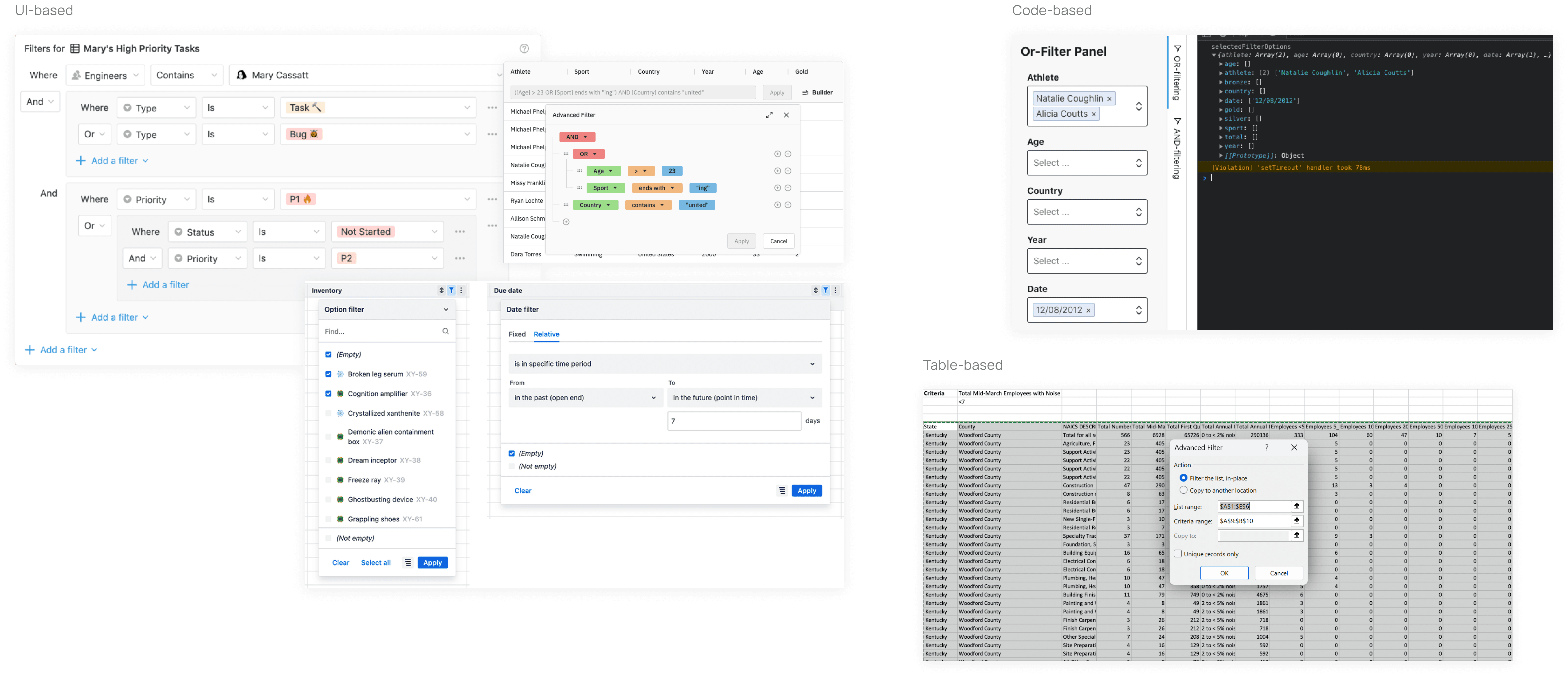
Defining requirements for the advanced filter
After diving deeper into difference advanced filters, I defined the filter's requirements with PM and engineers
Code and no-code configurations
Saved and unsaved states
Categories for saved filters
Network Service Platform compatibility
How might we design an advanced filter that's simple and intuitive to operators?
Advanced filters are inherently complex, they involve complex code, multiple conditions, and mixed logic, so I wanted to make it simple and intuitive for operators.
Building on operators' mental model
IOperators already filter data through simple filters on the table-header. So, I designed the advanced filter to follow that same interaction pattern. This way, operators can learn a new feature through a pattern they already trust.

💡
What if users could create advanced filters by filtering the table headers?
I worked with engineers to bring this to life. In the final solution, operators can create the advanced filter code directly through the table headers. Because it builds on an existing pattern, operators don't need to learn a new interface or mental model, and our team shipped this in weeks!
How might we help users understand that their individual column filters have combined into an advanced filter that they can save?
When users filter using the table headers, they need visual cues that communicate 1) their table selections have combined into an advanced filter and 2) the next step - to apply or save the filter.

I explored 3 possibilities with components in our design system
In all explorations, the cue appears only when the system detects an advanced filter - specifically, any filter containing multiple conditions or complex logic.


Final solution
In the end, the team shipped the single chip design and I documented the multi-chip design for future considerations.
How might we make it clear to users that changing table headers doesn't automatically change their saved filter and provide a clear pathway to save those changes if they choose?
When operators apply a saved filter, they often adjust the table‑header filters to add or remove conditions. This creates a mismatch between the saved filter and what's actually filtered in the table. This presented a common but confusing scenario for users.

The solution came down to 3 possibilities.

⚠️
Under Construction
Oops, caught you mid-build! This section is still under construction, please come back sson for the full case study :)
REFLECTION
What did I learn?
🔄️
Build on existing interactions
Often times, the best design builds on what users already know and love. This taught me about building in systems rather than isolated screens, and to get sharper about when to invent something new versus when to build on something existing.
🚧
Turning technical complexity into simplicity
I learned to see constraints not as limitations but as a way to help me focus, force tough decisions, and stay solution-oriented.